
Multi-branch business systems
Calisonic
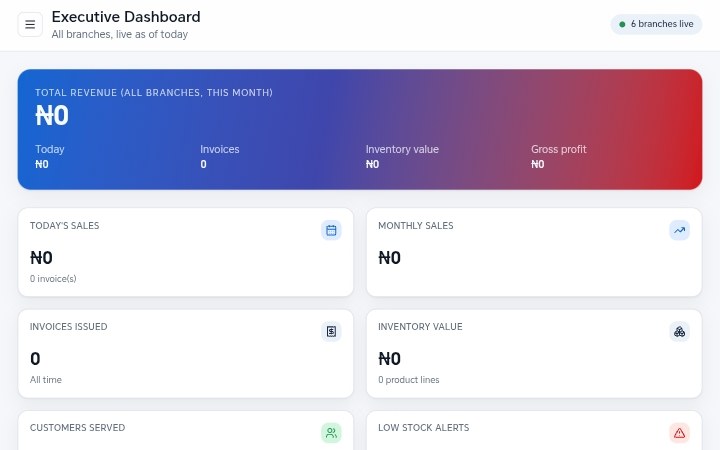
A multi-branch business running on separate records per branch, with no single view of revenue, stock or branch performance. We built an executive dashboard that pulls every branch into one screen.
The brief
Calisonic operates across more than one branch. Each branch knew its own position well. Nobody could see the business as a whole without asking every branch and waiting for answers to come back.
The ask was not a new accounting package. It was a single screen that a decision-maker could open and trust — revenue, inventory and branch-by-branch performance, without a reconciliation exercise first.
What was actually going wrong
The real cost of separated records is not the data entry. It is the delay. When the answer to "how did we do last week" takes two days to assemble, decisions get made on memory instead of numbers, and by the time the report arrives the moment to act has passed.
The second cost is disagreement. When two branches count the same thing slightly differently, every conversation about performance starts with an argument about whose figure is right, before anyone gets to what to do about it.
So the problem to solve was not reporting. It was agreeing on one definition of each number, having every branch record it the same way, and putting the result somewhere the owner could look at without asking permission.
Before and after
| Area | Before | After |
|---|---|---|
| Where the numbers lived | Separate records per branch, reconciled by hand | One database, every branch writing into it |
| How the owner saw performance | Asked each branch and waited | Opens one dashboard and reads it |
| Reporting cycle | Assembled at month end | Available whenever it is opened |
| Inventory visibility | Known branch by branch | Visible across branches in one place |
What we built
One shared data model across branches
Before any screen was designed, we wrote down what a sale is, what a branch is, and how inventory movements are recorded — once, for everyone. Every branch now writes into that same shape, which is what makes the comparison across branches honest.
An executive dashboard as the front door
The landing screen answers the questions the owner actually asks: what came in, from where, how does that compare with the period before, and which branch is moving differently from the rest. Detail is one click away, not on the front page.
Branch performance side by side
Branches are compared on the same measures on one screen. That turns a vague sense that one branch is struggling into something specific enough to act on.
Live inventory across locations
Stock is tracked per branch and visible across branches, so a shortage in one place can be answered from another instead of a fresh purchase.
Built for phones and imperfect networks
The dashboard is used from a phone as often as a laptop, frequently on mobile data. Screens are light, and the system does not lose half-entered work when the connection drops mid-form.
Decisions worth explaining
Fewer numbers, better chosen
The first draft had far more panels than the finished screen. Every panel that did not change a decision was removed. A dashboard people read beats a dashboard that contains everything.
Roles from day one
Branch staff see their branch. Management sees everything. This was built in at the start, not added later, because retrofitting access control into a live system is far more expensive than designing it in.
Phase one shipped before phase two was designed
The dashboard went live with core revenue and inventory before the extended reporting was built. Real use tells you which of your planned phase-two features nobody actually wanted.
Where it stands now
Calisonic now has one place that answers "how is the business doing" without a reconciliation exercise. The owner reads it directly rather than requesting it.
Branch comparison is a routine part of management conversation instead of an occasional project, because the numbers are on the same basis and always available.
The system is live at calisonic.org and continues to be extended as new reporting needs come up.
What we would tell the next client
- Agreeing definitions is most of the work. The dashboard is the easy part.
- A daily-use screen must load fast on a mid-range phone or it quietly stops being used.
- Ship the first useful version early; let real use decide what comes next.
Recognise your own business here?
Bring the process that costs you the most time. We will tell you what it would take to fix it.
Book a consultation